
E-File Form 1098-Q Online – Qualifying Longevity Annuity Contracts
Effortless 1098-Q Online Filing with Tax2efile

Simple Steps to E-File Form 1098-Q
 Register with Tax2efile
- Provide Required Tax Information
- Submit Your Form to IRS
Why Choose Tax2efile?
- Quick, Secure, and Reliable Platform
- Easy Bulk Filing Feature & Premium Service
- Unified Platform for All Your Tax E-Filing Needs
E-File Form 1098-Q Online with Tax2efile
Need to report a qualifying longevity annuity contract (QLAC) to the IRS? Tax2efile helps contract issuers prepare and e-file Form 1098-Q online. Enter the required information, review the contract details, and complete your filing without preparing paper returns manually.

What is Form 1098-Q?
Form 1098-Q, Qualifying Longevity Annuity Contract Information, is an IRS information return used to report details about annuity contracts intended to qualify as QLACs.
A QLAC is a type of deferred annuity designed to provide retirement income later in life. It is generally purchased through certain retirement plans or traditional IRAs, with payments scheduled to begin at a future date.
Insurance companies and other organizations that issue these contracts must report information such as the annuity start date, premiums paid, and the contract’s fair market value.
Form 1098-Q also provides participants with an annual statement of their contract information.
Who is Required to File Form 1098-Q
Insurance companies and other entities that issue contracts intended to qualify as QLACs are responsible for filing Form 1098-Q with the IRS.
These contracts may be purchased or held through certain qualified retirement arrangements, including:
- Qualified retirement plans under Section 401(a).
- Annuity plans under Section 403(a).
- Tax-sheltered annuities under Section 403(b).
- Traditional IRAs and other applicable arrangements under Section 408, excluding Roth IRAs.
- Eligible governmental deferred compensation plans under Section 457(b).
For example, if an insurance company issues a qualifying longevity annuity contract through an eligible retirement plan, the company must generally report the contract’s required information each year.
The individual who owns the contract receives the participant’s statement. The contract issuer is responsible for filing Form 1098-Q with the IRS.
How to E-File Form 1098-Q with Tax2efile
You can prepare Form 1098-Q online with Tax2efile using the information from your annuity contract and premium records.
- Step 1: Sign In to Tax2efile
Log in to your Tax2efile account or create an account to get started. - Step 2: Select Form 1098-Q
Choose Form 1098-Q and enter the required issuer and participant information. - Step 3: Add Contract and Premium Details
Enter the annuity of start date, total premiums, year-end contract value, and other applicable information. If you’re preparing multiple returns, use the available spreadsheet bulk upload option. - Step 4: Review Your Information
Check the participant’s details, contract information, and reported amounts before proceeding.

The account number is required if you have multiple accounts for a recipient for whom you are filing more than one Form 1098-Q. The IRS encourages you to designate an account number for all Forms 1098-Q that they file.
Form 1098- Q Boxes Explained
- Box 1a: Annuity Amount on Start Date
- Box 1b: Annuity start date
- Box 2: Checkbox, Check if the start date may be accelerated
- Box 3: Total premiums
- Box 4: FMV of QLAC
- Box 5a to 5l: Month-wise Premiums – Enter the amount of each premium paid for the contract

Watch our step-by-step video on How to E-File IRS Form 1098-Q with Tax2efile
When is the Due Date to File Form 1098-Q?
| Filing Type | Deadline |
|---|---|
| Recipient copy | January 31st |
| IRS Paper Filing | February 28th |
| IRS Electronic Filing | March 31st |
Note: If the due date/deadline falls on a Saturday, Sunday, or federal holiday, the filer will need to E-file 1098 on the next business day.
Get Started by Registering with Tax2efile Today!
Our IRS-approved e-fling services make tax season stress-free. Sign up Today!

Frequently Asked Questions
Find answers to commonly asked questions about our products and services.
Form 1098-Q is used to report an issued qualified longevity annuity contract (QLAC). Prior to annuitization, the value of a QLAC is excluded from the account balance that is used to determine required minimum distributions. A QLAC is an annuity contract that is purchased from an insurance company for an employee under any plan, annuity, or account described in section 401(a), 403(a), 403(b), or 408 (other than a Roth IRA) or eligible governmental plan
Details required to file Form 1098-Q are Issuers & Participants Name, Address. TINs, Annuity amount/date, Total premiums, FMV of QLAC.
Yes, Tax2efile offers a bulk upload feature that allows the user to upload all of the payers to an excel sheet for a faster process.
Tax2efile allows you to correct a mistake to the payers’ information for TINs, Names & amounts.
Yes, Tax2efile offers printing and mailing service! Our dedicated team will print and mail out each form you filed.
Yes, Form 1098-Q may be subject to late filing penalties if filed after the due date. It’s important to file on time to avoid potential penalties.
Yes, Tax2efile provides options for correcting or amending previously filed Form 1098-Q, ensuring accurate reporting and compliance with IRS regulations.
Using our fast electronic service, you can complete your filing within 5 minutes.
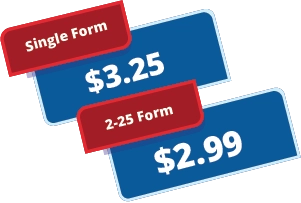
To file Form 1098-Q for a single return the filing fee is $3.25.
The IRS requires Form 1098-Q to be submitted by February 28 through the mail and by March 31 if you file the form electronically however, recipients’ copy should be mailed by January 31.
Yes. Failing file Form 1098-Q by the IRS deadline may result in penalties. The penalty is $60 per form if filed within 30 days after the deadline, $130 per form if filed more than 30 days late but by August 1, and $340 per form if filed after August 1 or not at all.
The required details to file Form 1098-Q include the name, address, and taxpayer identification number of the account holder receiving the distribution, as well as the amount of the distribution.
Form 1098-Q is used to report distributions from qualified education programs, such as Coverdell Education Savings Accounts (ESAs).
Still have questions?
If you have more questions, please refer to our FAQ page. Contact our customer support team for assistance.


