
File Form 1099-T Online for the 2026 Tax Year
E-File 1098-T Form with IRS Authorized Tax Filing Application

Simple Steps to E-File Form 1098-T
 Register with Tax2efile
- Provide Required Tax Information
- Submit Your Form to IRS
Why Choose Tax2efile?
- Quick, Secure, and Reliable Platform
- Easy Bulk Filing Feature & Premium Service
- Unified Platform for All Your Tax E-Filing Needs
E-File Form 1098-T Online with Tax2efile
Preparing tuition statements for your students? Tax2efile helps colleges, universities, vocational schools, and other eligible filers prepare and electronically file Form 1098-T with the IRS.
You can enter forms individually or use our spreadsheet bulk upload option when you have multiple students to report. With volume-based pricing and available student-copy delivery services, your team can manage the filing process without entering every return separately.

What is Form 1098-T?
Form 1098-T, Tuition Statement, is an information return filed with the IRS by qualified educational institutions to report their tuition payments and other required information on students enrolled during the calendar year.
Educational institutions use this form to report the payments received for qualified tuition and related expenses, scholarships or grants received, adjustments from prior years, and certain enrollment information.
This information will be useful for students to prepare their income tax returns when required and helps to determine whether they qualify for education tax credits.
Who is Required to File Form 1098-T?
Eligible educational institutions generally must file Form 1098-T for each student enrolled during the tax year who has a reportable transaction.
This includes qualifying colleges, universities, vocational schools, and other postsecondary institutions eligible to participate in federal student aid programs.
An organization that receives or collects qualified tuition payments on behalf of an institution may also have a filing responsibility. Certain insurers must file Form 1098-T when they reimburse or refund qualified tuition and related expenses.
How to E-File Form 1098-T with Tax2efile
- Step 1 – Create Your Tax2efile Account
Sign in or register for an account, then select Form 1098-T and the tax year you’re filing for. - Step 2 – Enter or Upload Student Information
Provide the institution’s details, student information, and the required tuition and scholarship amounts. Use bulk upload options to file multiple students. - Step 3 – Review and Submit Your Forms
Check the student details, taxpayer identification numbers, tuition amounts, and other reportable information. - Step 4 – Follow Your Filing Status
Use the available status updates to follow your returns through processing. You can also arrange student-copy delivery using the services available for your filing.


Watch our step-by-step video on How to E-File IRS Form 1098-T with Tax2efile
Form 1098-T Tax Form Boxes Explained
- Box 1: Payments Received for Qualified Tuition and Related Expenses
- Box 2: Reserved
- Box 3: Reserved
- Box 4: Adjustments Made for a Prior Year
- Box 5: Scholarships or Grants
- Box 6: Adjustments to Scholarships or Grants for a Prior Year
- Box 7:Checkbox for Amounts for an Academic Period Beginning in January Through March of 2025
- Box 8: Check if at Least Half-Time Student
- Box 9: Check if a Graduate Student
- Box 10:Insurance Contract Reimbursements or Refunds
When is the Due Date to File the 1098-T Tax Form?
| Filing Type | Deadline |
|---|---|
| Recipient copy | January 31st |
| IRS Paper Filing | February 28th |
| IRS Electronic Filing | March 31st |
Note:If the due date/deadline falls on a Saturday, Sunday, or federal holiday, the filer will need to E-file on the next business day.
Form 1098-T and Education Tax Credits:
Education Tax Credits are used to reduce your tax liabilities and help to offset the cost of higher education. Two types of education tax credits are available such as the American Opportunity Credit (AOC) and Lifetime Learning Credit (LLC). The American Opportunity Credit (AOC) is available for the first four years of postsecondary education and allows eligible taxpayers to receive claims up to $2500. The LLC is available for an unlimited number of years and allows eligible taxpayers to receive a wide range of educational expenses.
Get Started by Registering with Tax2efile Today!
Our IRS-approved e-fling services make tax season stress-free. Sign up Today!

Frequently Asked Questions
Find answers to commonly asked questions about our products and services.
Form 1098-T provides the total dollar amount paid by the student for qualified tuition and related expenses (or “QTRE”) in a single tax year.
You must file Form 1098-T if you are an eligible educational institution. An eligible educational institution that is a governmental unit, or an agency or instrumentality of a governmental unit, is subject to the reporting requirements of Form 1098-T. A designated officer or employee of the governmental entity must satisfy the reporting requirements of Form 1098-T
Details needed to file Form 1098-T are: Filers & Students Name, Address, TIN, Payments received, adjustments made for a prior year, Scholarships/Grants amounts or any adjustments.
Tax2efile allows you to correct a mistake to the recipients’ information for TINs, Names & amounts.
Yes, Tax2efile offers printing and mailing service! Our dedicated team will print and mail out each form you filed.
Educational institutions, including colleges, universities, and vocational schools, that have enrolled students and received payments for qualified tuition and related expenses must file Form 1098-T.
Using our fast electronic service, you can complete your filing within 5 minutes.
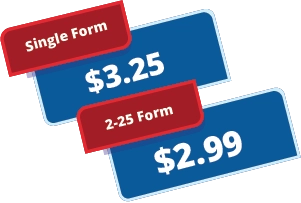
To file Form 1098-T for a single return the filing fee is $3.25.
The IRS requires Form 1098-T to be submitted by February 28 through the mail and by March 31 if you file the form electronically however, recipients’ copy should be mailed by January 31.
Yes. Filing Form 1098-T after the IRS deadline may result in penalties ranging from $60 to $340 per form, depending on how late the return is filed. The annual maximum penalty can reach $4,191,500 for larger organizations, while lower limits apply to eligible small businesses. Separate penalties may also apply for failing to provide students with their Form 1098-T statements on time.
The required details to file Form 1098-T include the student’s name, address, taxpayer identification number (TIN), and the amount of payments received or billed for qualified tuition and related expenses.
Yes, Tax2efile may charge a filing fee for Form 1098-T submission. The fee depends on the specific services chosen and any additional features selected by the user.
Still have questions?
If you have more questions, please refer to our FAQ page. Contact our customer support team for assistance.


